
- 기본 타입: 숫자 + 참조(숫자 제외 타입 + 함수 객체)
1
2
3
4
5
6
7
  // undefined 형 = undefined, null 둘 다

  var emptyVar;
  var nullVar = null;

  console.log(typeof emptyVar, typeof nullVar); // undefined, object
  console.log(emptyVar, nullVar); // undefined, null
- 숫자 타입 자바하고 다른 점: 정수, 실수 나누어져 있지 않음 → number 타입은 모두 실수로 처리됨
1
2
  var num = 5/2;
  console.log(num); // 2.5
- 타입에 따른 값 변화
- 기본 타입 재할당: 안 바뀜
- 참조 타입 재할당: 바뀜 ```javascript var a = 100; var objA = { value:100 };
function changeArg(num, obj) { // obj: objA가 참조하는 객체 위치 값이 그대로 전달됨 num = 200; obj.value = 200; // 실제 객체의 value 프로퍼티값이 changeArg() 호출 후에도 적용됨
1
2
console.log(num); // 200
console.log(obj); // {value: 200}   }
changeArg(a, objA);
console.log(a); // 100 console.log(objA); // {value: 200} ```
- 배열과 객체 모두 object임
1
2
3
4
5
6
7
8
9
  var colorsArray = [];
  var colorsObj = {};
  var array = [{a:1}, {b:2}];

  console.log(typeof colorsArray); // object (array X)
  console.log(typeof colorsObj); // object
  console.log(typeof array); // object

  // Object.prototype > Array.prototype 과 같은 포함관계라 그럼
- 배열 객체의 부모인 Array.prototype은 pop(), push() 메서드 보유 → 배열은 해당 메서드 사용 가능
- 함수 선언문 방식
1
2
3
4
5
  function add (x, y) {
  return x + y;
  }

  console.log(add(3, 4)); // 7
- 함수 표현식 방식
1
2
3
4
5
6
7
  var add = function(x, y) {
  return x + y;
  }

  var plus = add;
  console.log(add(3, 4)); // 7
  console.log(plus(5, 6)); // 11
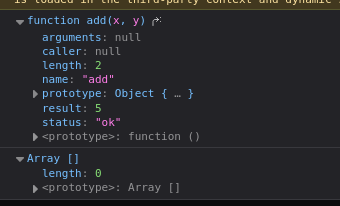
![[add와 plus 함수 변수는 두 개의 인자를 도하는 동일한 익명 함수를 참조함]](https://raw.githubusercontent.com/abarthdew/back-and-forth/main/01-programming-languages/javascript/images/js-summary-01.png)
- length 프로퍼티
- 배열 객체: 배열의 원소 개수
- 함수 객체: 인자의 개수
- 객체의 구조
- 객체 내부의 인자 또는 프로퍼티
- (함수 객체일 경우만) prototype 프로퍼티: 함수 생성
- contructor 프로퍼티 하나만 있음
- [[Prototype]] 프로퍼티: 부모 객체(부모 객체 안에 [[Prototype]]도 부모의 부모 객체)
![]()
- 콜백 함수
- 익명 함수의 대표적인 함수
- 시스템에서 호출되는 함수
- 인자로 들어가 실행되는 함수 ```javascript function findUserAndCallBack(id, cb) { const user = { id: id, name: “User” + id, email: id + “@test.com”, }; cb(user); }
findUserAndCallBack(1, function (user) { console.log(“user:”, user); }); ``` ### What’s the Difference Between a Regular Function and a Callback Function?
- Regular Function:
- A function that executes immediately when it is called and returns a value directly.
- Works perfectly in synchronous code but falls apart in asynchronous situations.
- Callback Function:
- A function passed as an argument to another function.
- It’s executed later, typically after some asynchronous operation (like
setTimeout, database query, or an API call) is complete. - 사용예제 - setTimeout 때문에 user 출력 안 됨
1
2
3
4
5
6
7
8
9
10
11
12
13
14
15
16
17
18
19
  function findUser(id) {
    let user;
    setTimeout(function () {
      console.log("waited 0.1 sec.");
      user = {
        id: id,
        name: "User" + id,
        email: id + "@test.com",
      };
    }, 100);
    return user;
  }

  const user = findUser(1);
  console.log("user:", user);

  결과
  // user: undefined
  // waited 0.1 sec.
- 콜백 함수로 해결[예제2][예제3]
1
2
3
4
5
6
7
8
9
10
11
12
13
14
15
16
17
18
19
  function findUserAndCallBack(id, cb) {
    setTimeout(function () {
      console.log("waited 0.1 sec.");
      const user = {
        id: id,
        name: "User" + id,
        email: id + "@test.com",
      };
      cb(user); // Call the callback with the user object
    }, 100);
  }

  findUserAndCallBack(1, function (user) {
    console.log("user:", user);
  });

  결과
  // waited 0.1 sec.
  // user: {id: 1, name: "User1", email: "1@test.com"}
- 내부 함수(클로저)
- 내부 함수는 외부 함수의 변수에 접근 가능 ```javascript function func1() { var str1 = 1 function func2() { var str2 = 2 function func3() { console.log(str1, str2) } func3() } func2() }
func1() // 1, 2 func2() // func2 is not defined
1 2 3 4 5 6 7 8 9 10 11 12 13
- func2() 와 같이 내부 함수는 외부에서 호출 안 되지만, 이렇게 하면 가능 ```javascript function parent() { var a = 100 var child = function () { console.log(a) } return child } var inner = parent() inner() - 함수를 리턴하는 함수
1
2
3
4
5
6
7
8
9
10
  var self = function() {
  console.log('a');
  return function () {
    	console.log('b');
    }
  }
  self(); // a
  self()(); // a // b
  self = self(); // a
  self(); // b
- 보충예제
- not just return, but if it is inner function, do i have to add more remark like
()? ```javascript // just return value; var add = function(x, y) { return x + y; } add(2, 3);
// return inner function; var self = function() { console.log(‘a’); return function () { console.log(‘b’); } }
// Directly calls both the outer and the returned inner function in a single statement. // : First calls the outer function, then the returned inner function. self()(); // a // b
// Calls the outer function, stores the returned inner function in a variable, then calls the inner function later. // : Calls the outer function and assigns the returned inner function to
func. var func = self(); // a // Invokes the inner function. func(); // b// implement itself self = self(); // a self(); // b ```
- not just return, but if it is inner function, do i have to add more remark like
- 보충예제
- 모든 객체는 자신을 생성한 생성자 함수의 prototype 프로퍼티가 가리키는 프로토타입 객체를 자신의 부모 객체로 설정하는 [[Prototype]] 링크로 연결함
- 생성자 함수 ↔ 프로토타입 객체
- 새로운 객체가 생성자 함수를 복사 ↔ 프로토타입 객체와 링크
- 객체 내 프로퍼티 값 ≠ 프로토타입 내 프로퍼티 값
- foo.getName() → foo에 있으므로 foo 찾음
- foo.getName()2 → foo에 없으므로 prototype에서 찾음 ```javascript // Person() 생성자 함수 function Person(name) { this.name = name; }
// getName() 프로토타입 메서드 Person.prototype.getName = function() { return this.name; };
// foo 객체 생성 var foo = new Person(‘foo’);
Person.prototype.name = ‘person’; console.log(Person.prototype.getName()); // person console.log(foo.getName()); // foo
Person.prototype.getName2 = function() { return this.name2; }; Person.prototype.name2 = ‘name2’; console.log(foo.getName2()); // name2 ```
- 프로토타입 객체가 중간에 완전히 바뀌면 이전에 객체 복사한 객체, 나중에 복사한 객체가 각각의 버전의 프로토타입 객체와 링크됨
- 프로토타입 객체 생성
- 프로토타입 토대로 객체 a 생성 → 프로토타입 객체 = {} 식으로 객체 값 변경 → 이 버전을 토대로 객체 b 생성 ⇒ b와 a의 내용은 다를 수 있음
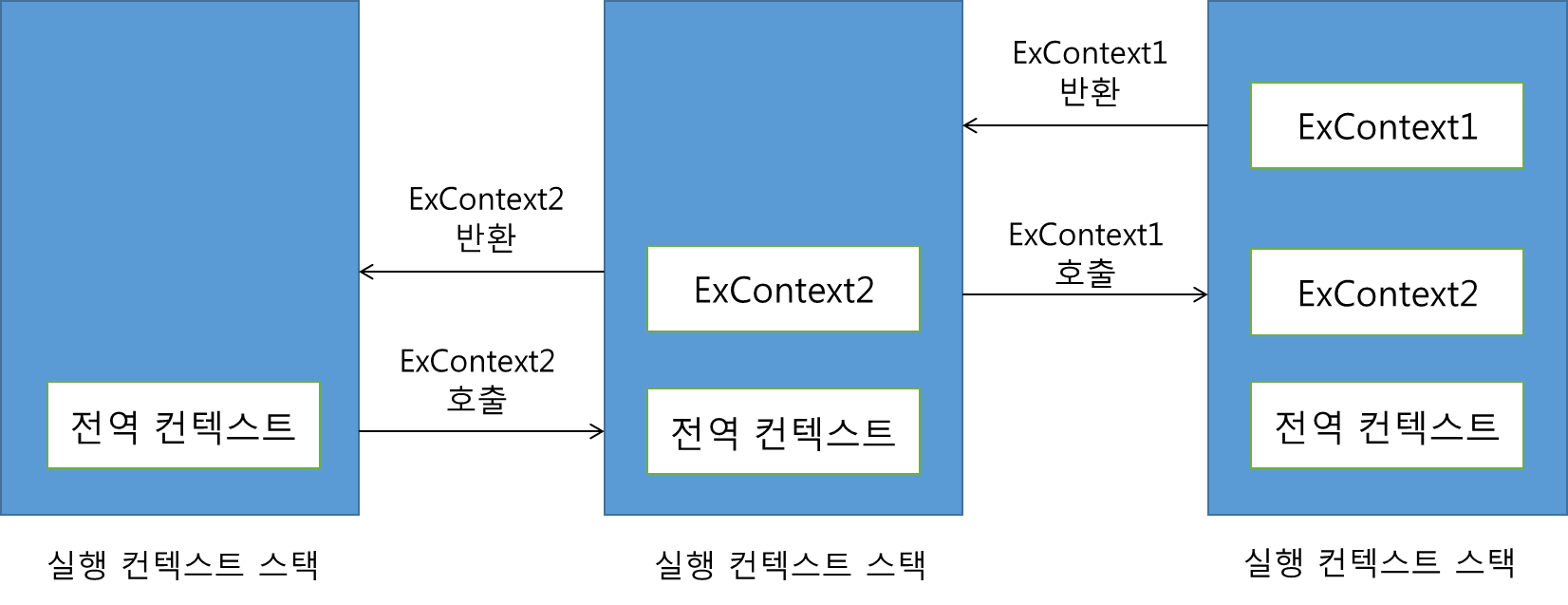
- 실행 컨텍스트: 실행 가능한 코드 블록(대부분 함수)
1
2
3
4
5
6
7
8
9
10
11
12
13
14
  console.log("this is global context"); // this is global context

  function ExContext1() {
  console.log("this is ExContext1");
  };

  function ExContext2() {
  ExContext1();
    console.log("this is ExContext2");
  };

  ExContext2();
  // this is ExContext1
  // this is ExContext2
![]()
- 변수만 있을 때: 전역 실행 컨텍스트
- 그래서 호이스팅이 생김. 제일 처음 전역 실행 컨텍스트에서 변수가 먼저 정의되기 때문.
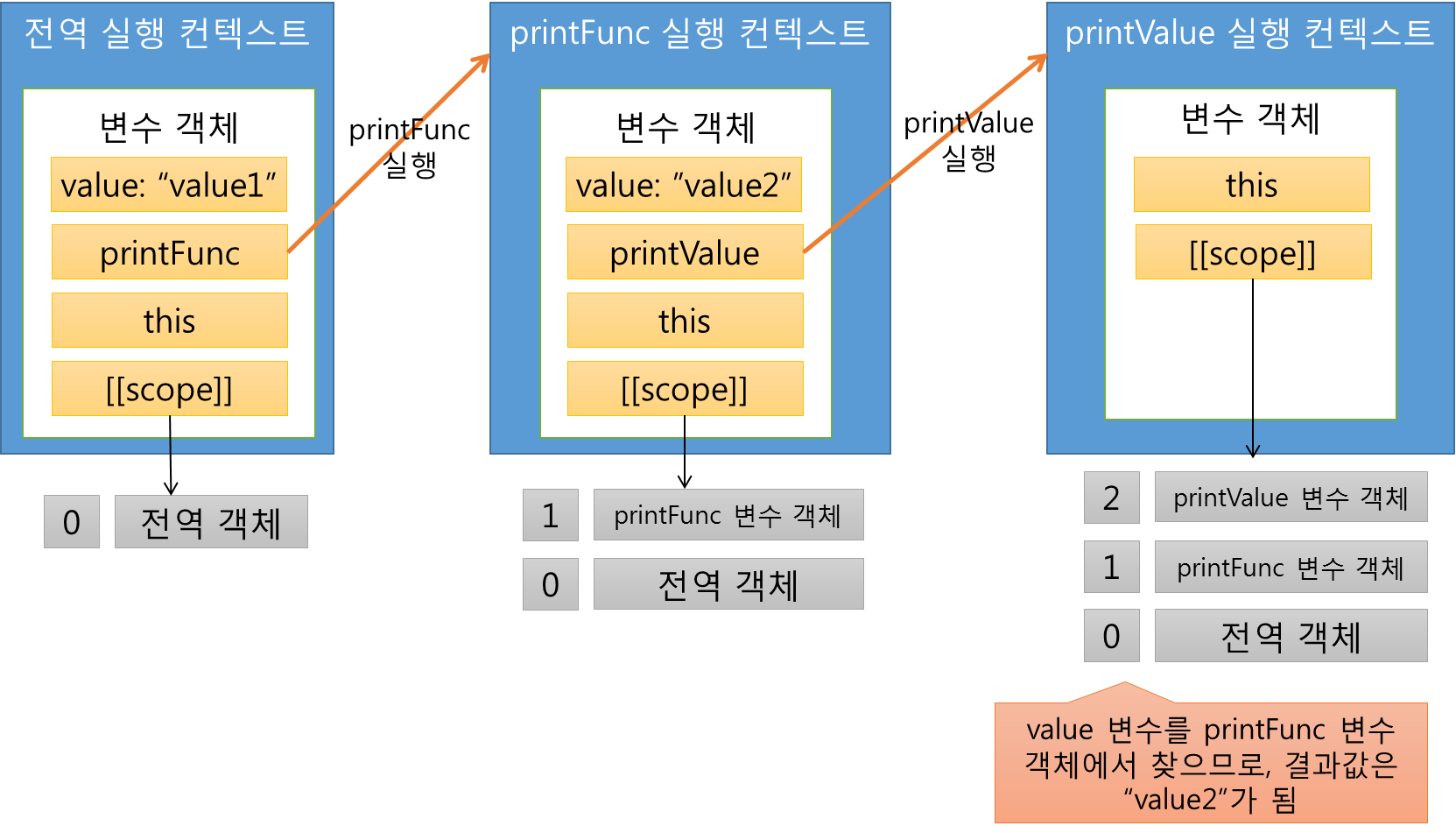
- 변수, 함수: 전역 실행 컨텍스트 → 함수 실행 컨텍스트 ```javascript var value = “value1”;
function printFunc() { var value = “value2”;
1 2 3 4
function printValue() { return value; } console.log(printValue()); } printFunc(); // value2 ```![]()
- 변수만 있을 때: 전역 실행 컨텍스트
- 클로저
1
2
3
4
5
6
7
8
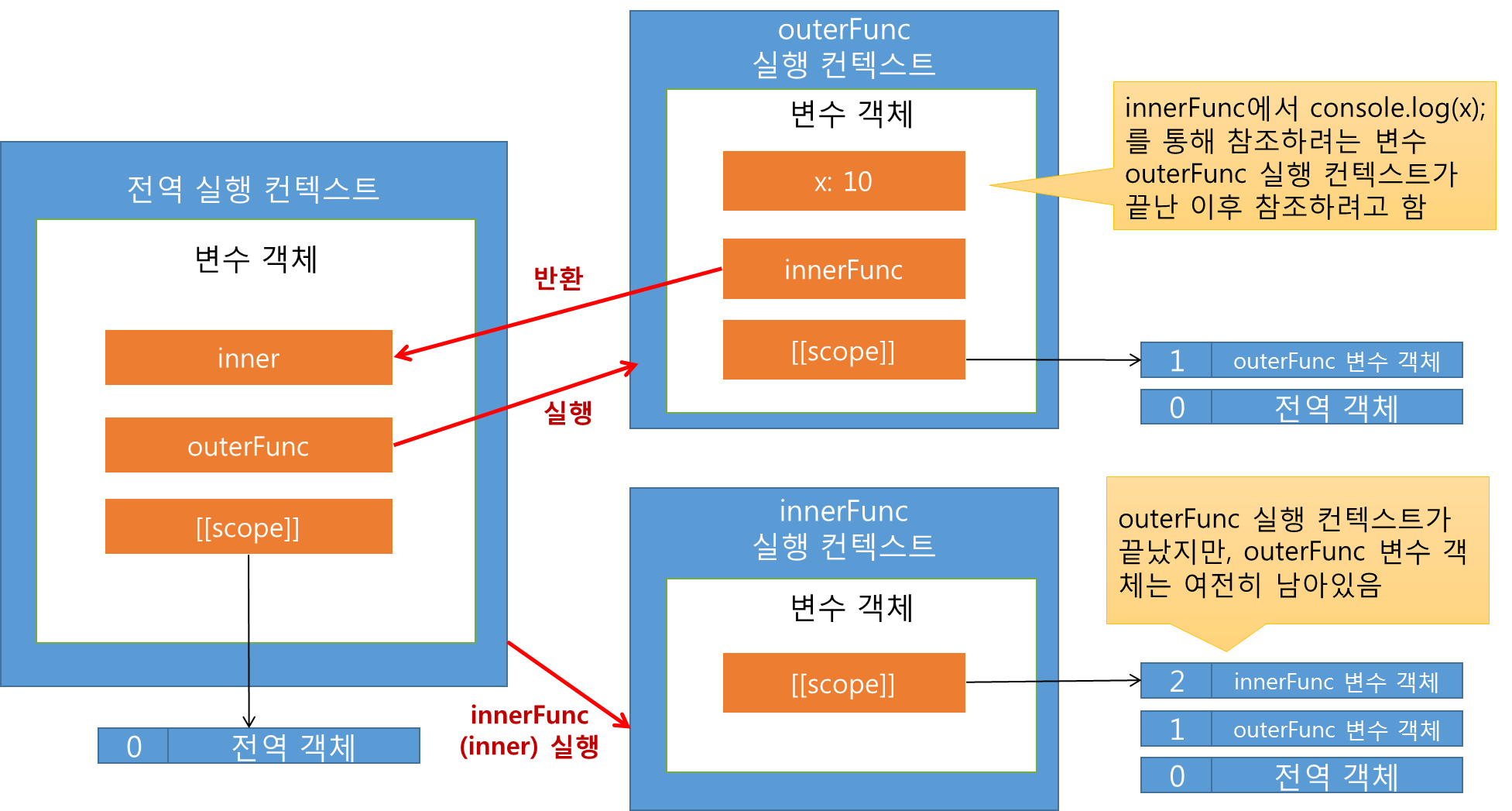
  function outerFunc() {
  var x = 10;
    var innerFunc = function() { console.log(x); }
    return innerFunc;
  }

  var inner = outerFunc();
  inner(); // 10
outerFunc() 실행 → 리턴된 innerFunc() 가 inner 변수에 할당(outerFunc()의 스코프까지 통째로 반환) → inner() 실행
⇒ innerFunc는 outerFunc의 변수 접근 가능
![]()
함수
push(), slice()
- push: 배열에 삽입
- slice: 배열 요소 삭제(delete는 배열 원소만 비움, 배열 자체를 삭제하지 않음)
for loop
- for
- forEach
- for of
- for in
In similar methods use, like for/forEach/for in, let me know about these things and compare to each of them.
Certainly! Let’s compare the different looping methods in JavaScript—
for,forEach,for...in, andfor...of—to see when and how to use each, as well as their key differences.
1. for Loop
- Description: The
forloop is a traditional loop that allows full control over the loop’s starting point, ending condition, and increment/decrement. - Usage: Works for iterating over arrays or counting a set number of times.
- Example:
1
2
3
4
5
  const array = [10, 20, 30];
  for (let i = 0; i < array.length; i++) {
    console.log(array[i]);
  }
Output: ```plain text 10 20 30
```
- Pros: Complete control over the loop index and structure.
- Cons: Verbose; requires managing the loop index and condition manually.
2. forEach Loop
- Description: The
forEachloop is a method available on arrays that executes a provided function once for each element. - Usage: Ideal for iterating over arrays when you don’t need to modify the loop index or exit early.
- Example:
1
2
3
  const array = [10, 20, 30];
  array.forEach(value => console.log(value));
Output: ```plain text 10 20 30
```
- Pros: Simplifies looping through arrays; no need to manage the index.
- Cons: Cannot break out of the loop early (no
breakorcontinuesupport).
3. for…in Loop
- Description: The
for...inloop iterates over the keys or property names of an object (or the indices in an array). - Usage: Best for objects, but can also work on arrays to access indices.
- Example with an Object:
1
2
3
4
5
  const obj = { a: 1, b: 2, c: 3 };
  for (let key in obj) {
    console.log(key, obj[key]);
  }
Output: ```plain text a 1 b 2 c 3
```
- Example with an Array:
1
2
3
4
5
  const array = [10, 20, 30];
  for (let index in array) {
    console.log(index, array[index]);
  }
Output: ```plain text 0 10 1 20 2 30
```
- Pros: Suitable for iterating over objects’ keys.
- Cons: Should be used cautiously with arrays, as it iterates over all enumerable properties (including custom properties added to arrays).
4. for…of Loop
- Description: The
for...ofloop iterates over iterable objects like arrays, strings, and other collection types (e.g., Maps, Sets). - Usage: Ideal for arrays and other iterables, as it directly retrieves each element’s value.
- Example with an Array:
1
2
3
4
5
  const array = [10, 20, 30];
  for (let value of array) {
    console.log(value);
  }
Output: ```plain text 10 20 30
```
- Example with a String:
1
2
3
4
5
  const string = "abc";
  for (let char of string) {
    console.log(char);
  }
Output: ```plain text a b c
```
- Pros: Simplifies syntax for working with iterables and directly provides element values.
- Cons: Not suitable for non-iterable objects, such as plain objects.
Summary Table
| Loop Type | Suitable For | Provides | Break/Continue Support | Common Use Case |
|---|---|---|---|---|
| for | Arrays, Counting | Index & Value | Yes | Full control over loop; manual setup |
| forEach | Arrays | Value | No | Simpler looping through array values |
| for…in | Objects, Arrays | Key (index) | Yes | Iterating over object properties |
| for…of | Iterables | Value | Yes | Working with values in arrays/strings |
Key Differences and When to Use
- Use **
for** when you need fine control over the loop (e.g., need to skip elements withcontinueor exit withbreak). - Use **
forEach** for straightforward array loops where you need only the values, but note that you cannot break out early. - Use **
for...in** when working with objects to access keys, although it can work with arrays (less common). - Use **
for...of** when working with iterable values (arrays, strings) directly, as it simplifies syntax and directly provides values.
Each loop has its own purpose, and picking the right one depends on the structure you’re iterating over and the level of control you need. Let me know if you’d like specific examples in a particular context!