
1. Features
1) What is PostgreSQL?

🛢 Oracle
🗄 MS SQL Server
🐬 MySQL
🐘 PostgreSQL ← NEW!!
2) History
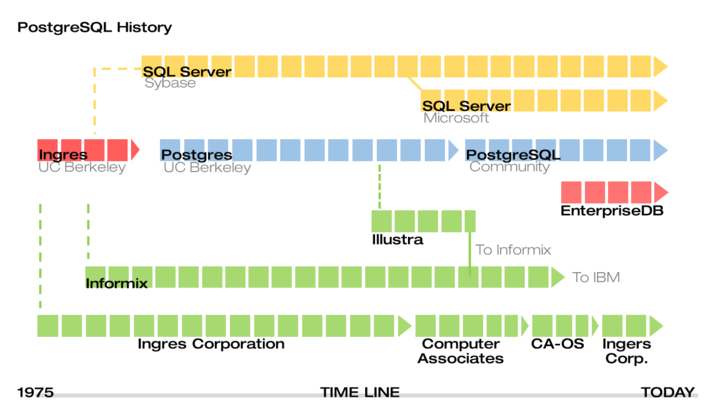
- In 1977, the University of California, Berkeley, USA
- Commenced a development project under the name
Ingres (INteractive Graphics REtrieval System)DB - The service ended in 1993, and PostgreSQL services began in 1997.
3) Keywords
Portable(휴대성)
- Developed in the C language
- Supports various platforms such as Windows, Linux, MAC OS/X, Unix Platform
- Supports ANSI/ISO standard SQL
Reliable(신뢰성)
- Provides ACID and transaction support to ensure reliable operations
- Implements MVCC, low-level locking, and other features to enhance concurrency performance
- Supports various indexing techniques
- Offers flexible full-text search capabilities
- Supports diverse and flexible replication methods
- Provides support for various procedural languages (PL/pgSQL, Perl, Python, Ruby, TCL, etc.)
- Supports various interfaces (JDBC, ODBC, C/C++, .Net, Perl, Python, etc.)
Scalable(확장성)
- Enables the implementation of Table Partitioning and Tablespace features for handling large-scale data processing.
Secure(보안)
- Data encryption, Access control, [
Log audit](https://webcache.googleusercontent.com/search?q=cache:edv21ZxF6k4J:https://postgresql.kr/docs/9.6/runtime-config-logging.html+&cd=9&hl=ko&ct=clnk&gl=kr&client=firefox-b-e) :Three aspects of DB security
Three aspects of DB security:
- Host-based authentication, Object-level permissions, Encryption of transmitted data between clients and the network through SSL communication
Recovery & Availability(복구, 이용)
- Achieve point-in-time recovery through Write-Ahead Logging (WAL) archiving and Hot Backup.
- Establish Hot Standby servers with synchronous and asynchronous Streaming Replication as a default option.
Advanced(발전)
- A sophisticated and stable open-source RDBMS.
- Allow upgrades using pg_upgrade.
- Provide web-based and client-server GUI management tools for monitoring, administration, and tuning.
- Receive support from a thriving community and commercial assistance.
- Offer well-crafted documentation and ample manuals.
4) Internal Structure
DATABASE Structure
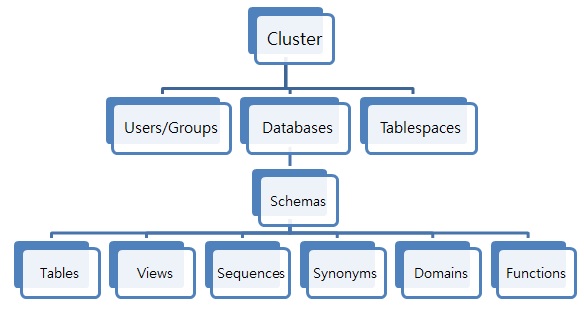
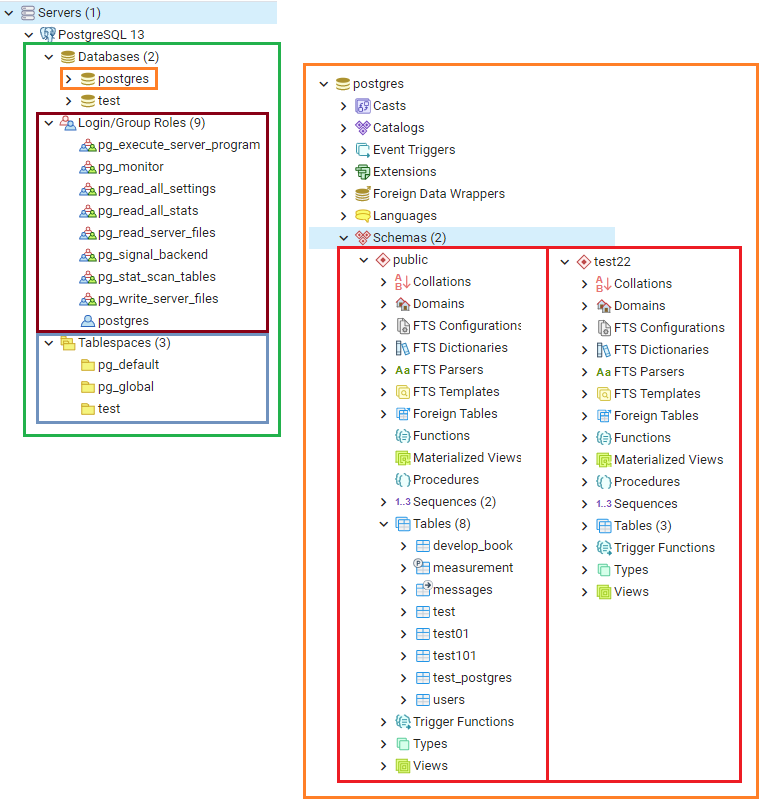
Schema
- A set of TABLEs, a concept that logically divides a single DATABASE.
- Tables from different DATABASEs cannot be joined.
- Tables from different schemas within the same DATABASE can be joined.
Key Creation Commands
1
2
3
4
5
6
7
8
9
10
11
12
13
14
15
16
17
18
19
20
21
22
23
24
25
26
27
28
29
30
31
32
33
-- Create user
CREATE USER [username] [[ WITH ] option [ ... ]]

-- Create table space
CREATE TABLESPACE [name] LOCATION '[location]';

-- Create database
CREATE DATABASE [db_name] WITH [TABLESPACE = [tablespace_name]] [AND] OWNER [username];
// CREATE DATABASE testdb WITH OWNER testdb;

-- Create schema
CREATE SCHEMA [sch_name] AUTHORIZATION [username];
// CREATE SCHEMA testdb AUTHORIZATION testuser;
// CREATE SCHEMA testdb_log AUTHORIZATION testuser;
// Three schemas created in the testdb: public, testdb, testdb_log.

-- 스키마에 대한 테이블 생성
CREATE TABLE "[sc_name]".[tb_name] ( ... );

-- Table creation for a schema
CREATE TABLE "[sc_name]".[tb_name] ( ... );

-- List of users
SELECT * FROM pg_shadow;

-- List of databases
SELECT * FROM pg_database;

-- List of table spaces
SELECT * FROM pg_tablespace;

-- List of tables
SELECT * FROM pg_tables;
template 데이터베이스
| oid | datname |
|---|---|
| 13442 | postgres |
| 16394 | test |
| 1 | template1 |
| 16749 | mytest2 |
| 16747 | mytest |
| 16736 | mytable |
| 13441 | template0 |
💡 CREATE DATABASE actually works by copying an existing database.
template1: The table copied by default when using CREATE DATABASE command.
- Users can modify elements in the template1 table itself.
- Subsequent tables created will have the elements from template1 table copied as is.
- For example, if PL/pgSQL procedural language is installed in template1, it can be used in tables created later.
template0: Has the same data as the initial state of template1.
- Therefore, if you want to create a new database with the user-defined elements added to template1, you can copy from template0 after making changes.
1
2
3
4
5
-- pgAdmin
CREATE DATABASE dbname TEMPLATE template[0 | 1];

-- shell
CREATEDB -T template[0 | 1] dbname
권한
🔰 GRANT : Grant permissions on the object to a user, group, or all users.
1
2
GRANT privilege [,...] ON object [,...]
    TO { PUBLIC | GROUP group | username}
🔰 REVOKE : Revoke access privileges from a user, group, or all users.
1
2
3
REVOKE privilege [,...]
    ON object [,...]
    FROM { PUBLIC | GROUP gname | username }
privilegeSELECT: Grant/revoke access to specific columns of a TABLE/VIEW.
INSERT: Grant/revoke permission to insert data into all columns of a specific TABLE.
UPDATE: Grant/revoke permission to update all columns of a specific TABLE.
DELETE: Grant/revoke permission to delete rows from a specific TABLE.
RULE: Grant/revoke permission to define rules for a specific TABLE/VIEW.
ALL: Grant/revoke all privileges.
object: Applicable objects include tables, views, sequences, and indexes.PUBLIC: Grant/revoke permissions to all users.
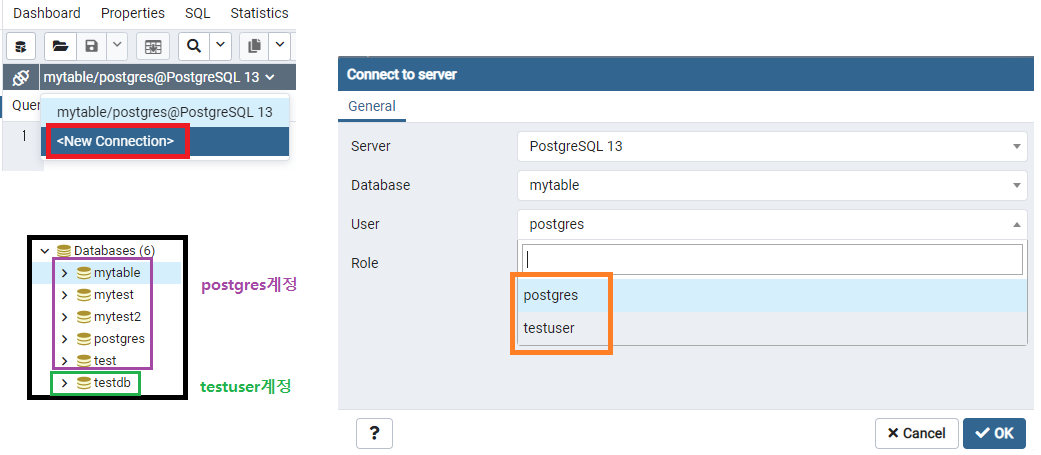
💡 When trying to access tables in another account’s database, the following errors may occur:
아키텍처
< Postmaster Daemon >
-
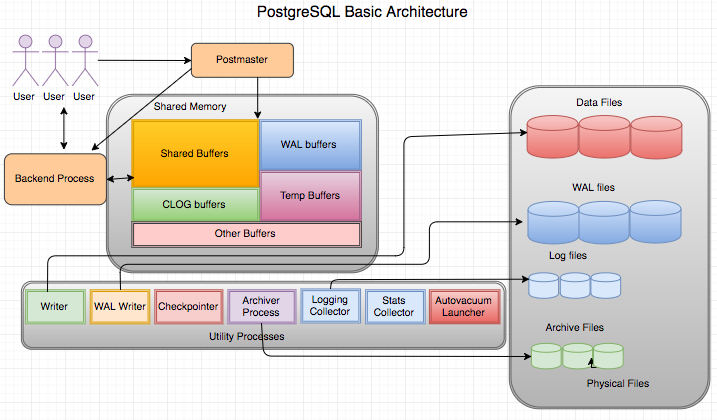
postmaster: The first process started when launching PostgreSQL. It performs initial recovery tasks, memory initialization, and starts background processes. As a daemon process, it receives connection requests from client processes and spawns backend processes.
< Shared Memory >
-
shared buffer: Space to store data blocks requested by users, and it is recommended to allocate more than 1/4 of server memory. -
WAL (Write Ahead Log) buffer: A buffer storing changes to data, and the WAL writer process records them in the WAL file. -
CLOG buffer: Commit log, a memory space caching the transaction status, indicating whether a transaction has been committed.
< Background Process >
-
Writer: Periodically writes dirty buffers to the data file. -
WAL writer: Writes WAL buffers to the WAL file. -
Checkpointer: Writes dirty buffers to the data file when a checkpoint occurs. -
Archiver Process: When using archive mode, copies WAL files to a specified directory. -
Logging Collector: Records error messages in the log file. -
Stats collector: Gathers database management system (DBMS) statistics, such as session performance information and table usage statistics. -
Autovacuum Launcher: Manages multiple versions of records in the database for Multi-Version Concurrency Control (MVCC). It cleans up records that are no longer referenced through vacuuming. Additionally, it performs tasks like cleaning up transaction IDs (XIDs) and table statistics. When vacuuming is needed, the Autovacuum Launcher requests the Postmaster process to start autovacuum worker processes.
< Backend Process >
-
Backend Processes- The maximum number can be configured with the
max_connectionsparameter, with a default value of 100. - Responsible for executing the query requests of user processes and transmitting the results.
- The maximum number can be configured with the
Simplify Architecture
💡 ①
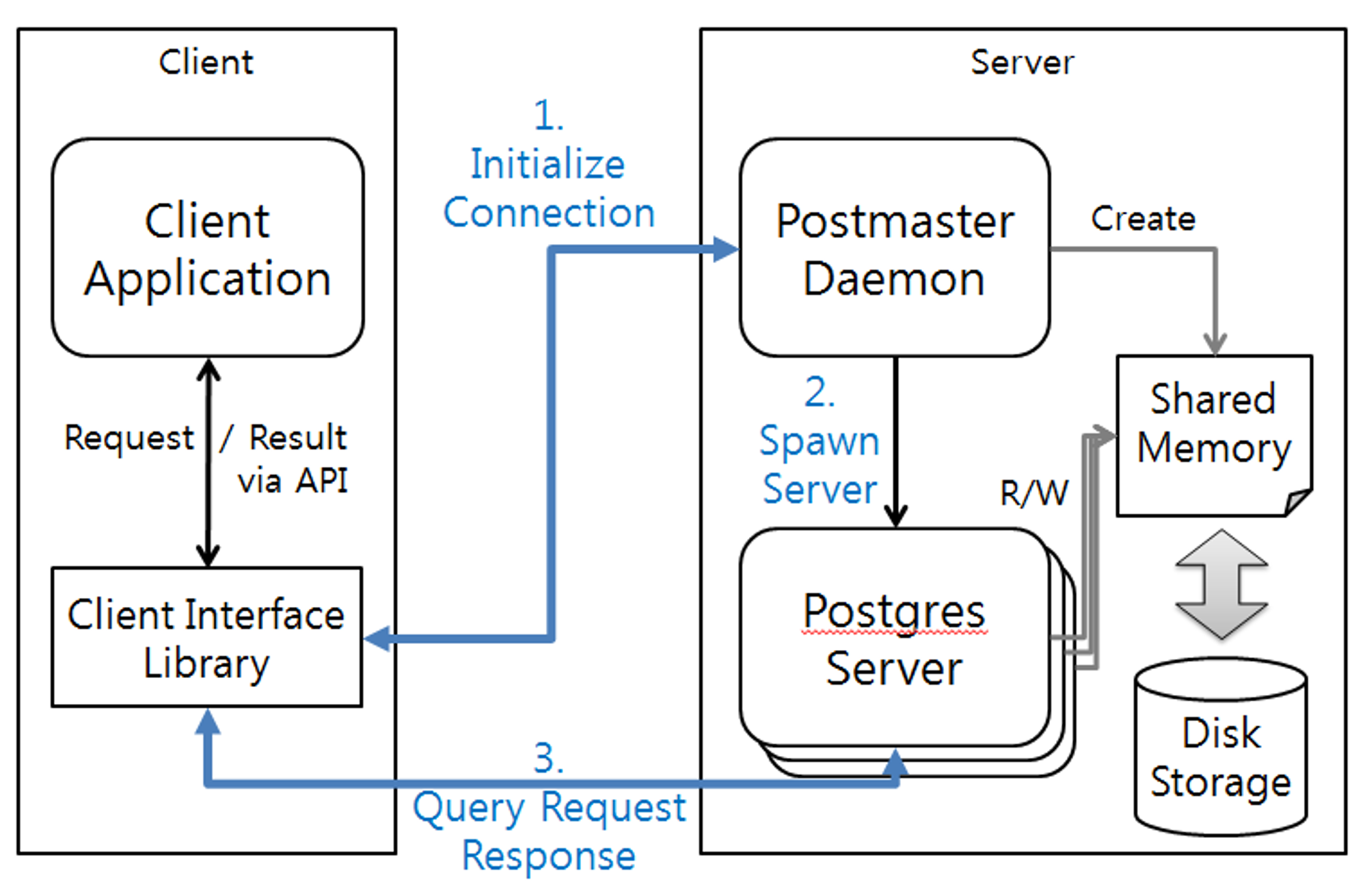
Connection Initialization: Client initiates a connection request to the server through interface libraries (JDBC, ODBC, etc.)
👉 ②Server Creation: Postmaster process mediates the connection to the server
👉 ③Query Request Response: The server performs the query on the allocated server and responds through the client.
5) Detailed Features and Limitations
| Feature Name | Meaning |
|---|---|
| 🚩 Nested transactions (savepoints) | Nested transactions (savepoints) |
| Point in time recovery | Point in time recovery |
| Online/hot backups, Parallel restore | Online/hot backups, Parallel restore |
| 🚩 Rules system (query rewrite system) | Rules system (query rewrite system) |
| 🚩 B-tree, R-tree, hash, GiST method indexes | B-tree, R-tree, hash, GiST method indexes |
| Multi-Version Concurrency Control (MVCC) | Multi-Version Concurrency Control (MVCC) |
| 🚩 Tablespace | Tablespace |
| Procedural Language | Procedural Language |
| Information Schema | Information Schema |
| I18N(Internationalization), L10N(Localization) | Internationalization, Localization |
| Database & Column level collation | Database & Column level collation |
| 🚩 Array, XML, UUID type | - |
| 🚩 Auto-increment (sequences) | Auto-increment (sequences) |
| 🚩 Asynchronous Replication | Asynchronous Replication |
| 🚩 LIMIT/OFFSET | LIMIT/OFFSET |
| Full text search | Full text search |
| SSL, IPv6 | Authentication |
| Key/Value storage | Key/Value storage |
| Table inheritance | Table inheritance |
1. Nested transactions (savepoints): 중첩된 트랜잭션(저장시점)
- Another transaction can be defined within a transaction.
- Flexible operations can be performed by setting a savepoint.
💡 Details
- Transaction operations in PostgreSQL: Use BEGIN before and COMMIT after the operations.
- Setting a savepoint:
2. Rules system (query rewrite system): 규칙 시스템(쿼리 다시 쓰기 시스템)
- Rules creation allows for extension of SELECT, INSERT, UPDATE, DELETE operations.
💡 Rarely used due to operational issues; currently replaced by triggers.
name: Rule nameevent: One of SELECT, INSERT, UPDATE, DELETE operationstable_name: Name of the table or view to apply the rule tocondition: SQL conditional expression (boolean return)INSTEAD: Execute the specified command instead of the original commandALSO: Execute additional commands along with the original commandcommand: Command composing the rule action. Valid commands are SELECT, INSERT, UPDATE, DELETE, or NOTIFY.
3. B-tree, R-tree, hash, GiST method indexes: B-트리, R-트리, 해시, GiST 메서드 인덱스
B-tree Index: An index based on a tree-like data structure that maintains the sorted order of data, enabling efficient operations such as search, insertion, deletion, and sequential access.
R-tree: An index based on a tree data structure optimized for spatial data, allowing fast queries on data divided into spatial regions.
Hash Index: An index that uses a hash function to locate the bucket containing the key value, providing a quick way to retrieve data.
GiST Method Index: An index provided by PostgreSQL that supports various indexing options, such as geometric data and text search documents.
1
2
3
4
5
6
7
// Index Creation
CREATE [ UNIQUE ] INDEX [ CONCURRENTLY ] [ [ IF NOT EXISTS ] name ] ON [ ONLY ] table_name [ USING index_method ]
    ( { column_name | ( expression ) } [ COLLATE collation_rule ] [ operator_class ] [ ASC | DESC ] [ NULLS { FIRST | LAST } ] [, ...] )
    [ INCLUDE ( column_name [, ...] ) ]
    [ WITH ( storage_parameter = value [, ... ] ) ]
    [ TABLESPACE tablespace_name ]
    [ WHERE condition ];
4. Tablespace: 테이블스페이스
- The file system path where the objects of the database can be stored as defined by the database administrator.
💡 It allows the database administrator to define the file system location where files representing database objects can be stored.
The physical space where database objects are stored on the file system.
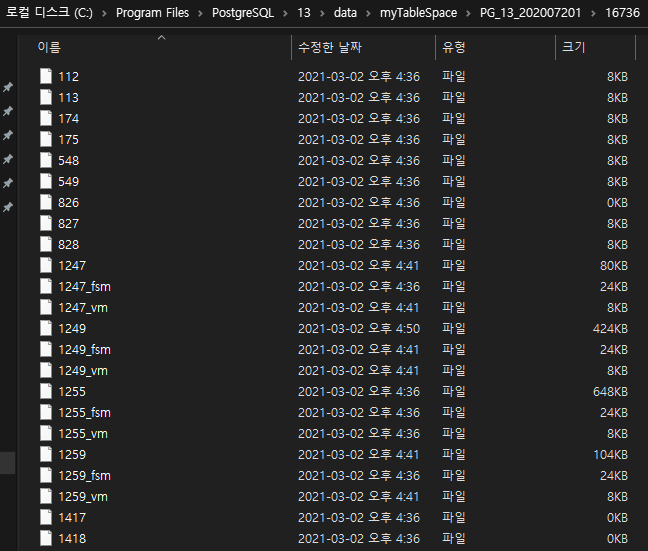
Using tablespace allows for the operation of using storage differently based on the purpose of the database, and it can also be utilized for purposes such as disaster response and recovery.
When a table is created in the corresponding database, the storage of the tablespace is used to store files representing the database objects.
DB_TS DB NAME DB ID TABLESPACE ID TABLESPACE NAME 1663 postgres 13442 1663 pg_default 1663 test 16394 1663 pg_default 1663 template1 1 1663 pg_default 1663 template0 13441 1663 pg_default 16735 mytable 16736 16735 mytablespace 16746 mytest 16747 16746 tbs1 16748 mytest2 16749 16748 tbs2 1663 newuserdb 16774 1663 pg_default 1663 testdb 16757 1663 pg_default
5. Array, XML, UUID type
- Support for various data types.
CREATE
INSERT
SELECT
6. Auto-increment (sequences): 자동 증가(시퀀스)
SEQUENCE
SERIAL
GENERATED { ALWAYS | BY DEFAULT } AS IDENTITY
7. Asynchronous Replication: 비동기 복제
- Log-Shipping, provides streaming replication.
💡 Source[Official][Official2][1][More detailed article on PostgreSQL Replication]
1. Why is replication necessary?
😨 If the operational server stops due to a failure,
→ 😧 Would operating a standby server improve availability?«br> → 🧐 If so, the data on the operational server and the standby server must match.
→ 😮 Replication is necessary!=
warm standby, orlog shippingfeature✔️ Both the operational server and the standby server must be running.
✔️ The operational server operates in archive mode, sending used WAL segment files (transaction log files) to the standby server in order.
✔️ The standby server runs in recovery mode only.
✔️ This method allows for easy replication management without the need to modify database tables.Log Delivery to Standby Server Implementation
- The operational server transports (ships) fully used WAL files to another server.
- Note that the log delivery method is asynchronous.
- In other words, since the WAL contents are already committed data, if the operational server stops before being sent to the server, it is lost (to reduce the loss, set the
archive_timeoutconfiguration value to a short time in seconds).- If the WAL file is delivered to the standby server in time, the time from the operational server stopping to the standby server taking over the role is very short, improving availability!
Types of Replication
When the server is running in standby mode, the server only performs the task of continuously reflecting WAL files received from the master server on its own server.
🔧 Log-Shipping(Warm standby)
The standby server checks if there is a new WAL file in the directory where the operational server sends the file and reflects the new WAL file.
🔧 Streaming Replication
Using TCP connection to directly connect the operational server and immediately reflect committed transactions to the standby server.
2. Streaming Replication
💡 Streaming-Replication : Streaming-Replication: A replication method that delivers WAL logs generated by the Master to the Slave DB in real-time to synchronize integrity.
3. More Detailed Article on PostgreSQL Replication
- Test environment: CentOS 7.5, PostgreSQL 10.4 version
1-1) WAL-Write Ahead Log
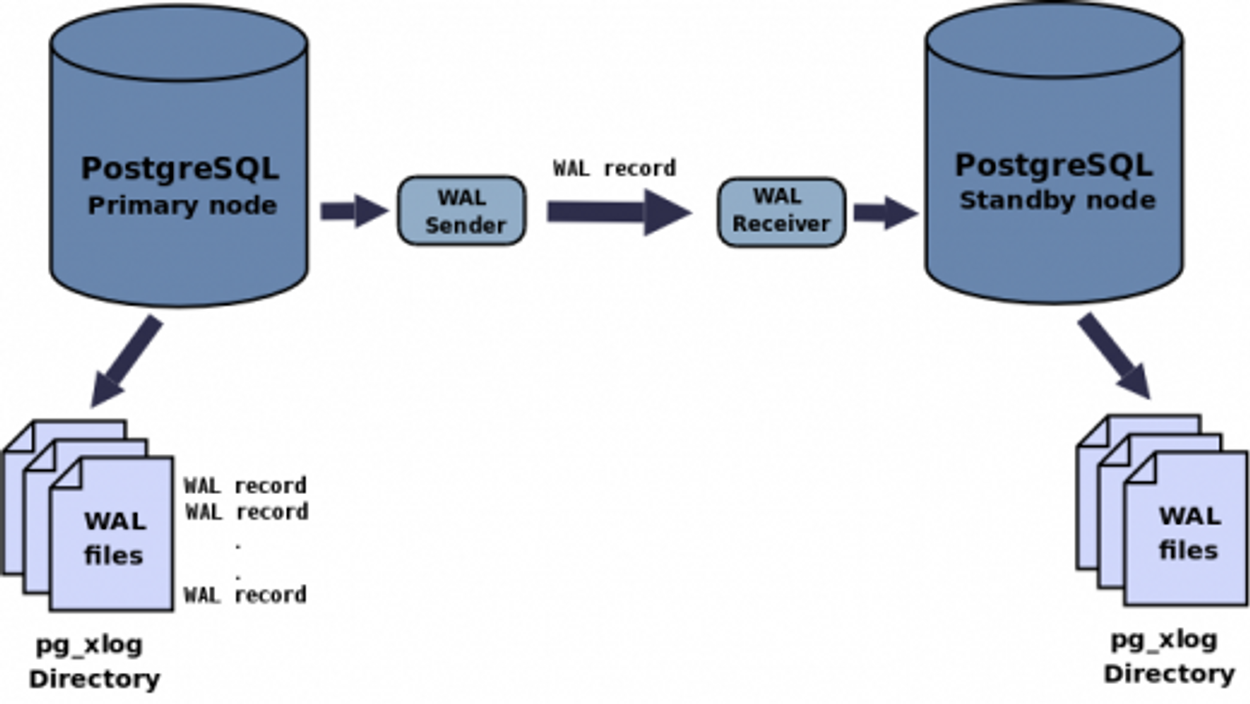
- Generates logs for all operations on the master server.
- Sends the generated logs to the standby server.
- Restores (re-executes) the received logs on the standby server.
💡 This operation creates a replication server with the same schema as the master server.
– The logs on the master server are called WAL and are stored in $install_path/data/pg_xlog.
– The installation path in the manual is /usr/local/pgsql/data.
1-2) WAL Delivery Method
< Log-Shipping Method >
- The WAL files themselves are sent from the pg_xlog directory to the standby server.
- The master server must fill the WAL files with a specified size before sending them to the standby server.
- During the time it takes to fill the files, data between the master and standby servers may be inconsistent.
- In the event of a master server failure, if the WAL files are not completely filled and transmitted, there is a risk of data loss.
< Streaming Method >
* Available in PostgreSQL version 9.0 and above
- Regardless of whether WAL files are stored, log contents are sent to the standby server.
- Assuming no network issues between servers, it operates almost in real-time.
- In the event of a standby server failure, to recover lost data, the standby server needs to be rebuilt from the beginning.
= It is advisable to apply Log-Shipping method even when using Streaming method.2. Applying Streaming Replication
- Proceeding with two servers, one master, and one standby.
- The executing account is the installation account, which is typically “postgres.”
2-1) Master Server Configuration
- To implement the streaming replication, create a dedicated replication user on the master server, which the standby server will use to access it.
- Set the access permissions for the created account.
- Configuration for replication.
2-2) Setting up the standby server
- Use the
pg_basebackupcommand to perform the initial backup.- Replicate/restore the entire
/usr/local/pgsql/datadirectory from the master server to the standby server.- Since all files in the standby server’s directory will be overwritten, it’s advisable to back up the
postgresql.conffile in advance.- After replication/restoration, recover the backed-up
postgresql.conffile.- The
/usr/local/pgsql/datadirectory must be empty for the replication/restoration to proceed.
- Configuring WAL content in streaming mode:
- Additionally, create a
recovery.conffile in the same path as thepostgresql.conffile.- Connect to the master server and receive WAL content in real-time using the information from the
primary_conninfooption.
2-3) Configuration Verification
- After completing the configuration for the master and standby servers, start the daemons for the master server and standby server sequentially.
[Master Server Running Status]
- To further confirm, you can execute the following query on the master server. ```jsx
ps -ef |grep postgres
postgres 17151 1 0 05:39 ? 00:00:00 postmaster -p 5432 -D /usr/local/pgsql/data postgres 17152 17151 0 05:39 ? 00:00:00 postgres: startup process recovering 000000010000000000000003 postgres 17153 17151 0 05:39 ? 00:00:00 postgres: checkpointer process postgres 17154 17151 0 05:39 ? 00:00:00 postgres: writer process postgres 17155 17151 0 05:39 ? 00:00:00 postgres: stats collector process postgres 17156 17151 0 05:39 ? 00:00:07 postgres: wal receiver process streaming 0/3000140
- If the replication setup is successful, you should see that the key being sent by the wal sender process on the master server (0/3000140) is being received on the standby server as well. ```
3. Applying Log-Shipping Replication
- To prepare for potential failures on the standby server, you can also implement the Log-Shipping method as an additional measure.
- The recovery of WAL on the standby server itself is done using the Streaming method, and the WAL files are stored as a backup.
3-1) Configure the directory to store WAL files
* Configured on the standby server
- This location doesn’t necessarily have to be on the standby server; it just needs to be accessible by it.
- In this guide, we’ve chosen to store it in the home directory of the ‘postgres’ account on the standby server (/usr/local/pgsql).
3-2) Configure passwordless scp operation
* Configured on the master server
- To enable automation, set up passwordless SSH access to the master server.
- WAL File Transfer Settings
- %p represents the full path of the archive (WAL) file, and %f is the file name.
3-3) Confirmation of Configuration
- After restarting the master server, you can confirm that files are accumulating in the specified directory on the standby server.
PostgreSQL Execution Script
- When installing PostgreSQL from source, daemon execution must be done using the pg_ctl command.
- For security reasons, PostgreSQL does not allow daemon execution with root privileges.
- Because of this, it is necessary to log in as a regular user to execute, typically using the account ‘postgres.’
- The following is the content of the script file for daemon execution as root when installing from source.
8. LIMIT/OFFSET: Limit/Offset
- Enables easy implementation of pagination.
9. SSL, IPv6: Authentication
- Specifies the connection type, client IP address range (if applicable to the connection type), database name, username, and authentication method in each record of the pg_hba.conf configuration file stored within the database cluster for connections.
💡 pg_hba.conf Record and Field Detail
10. Key/Value storage: Key/Value Storage
- The module called hstore is provided in PostgreSQL to store a set of key/value pairs.
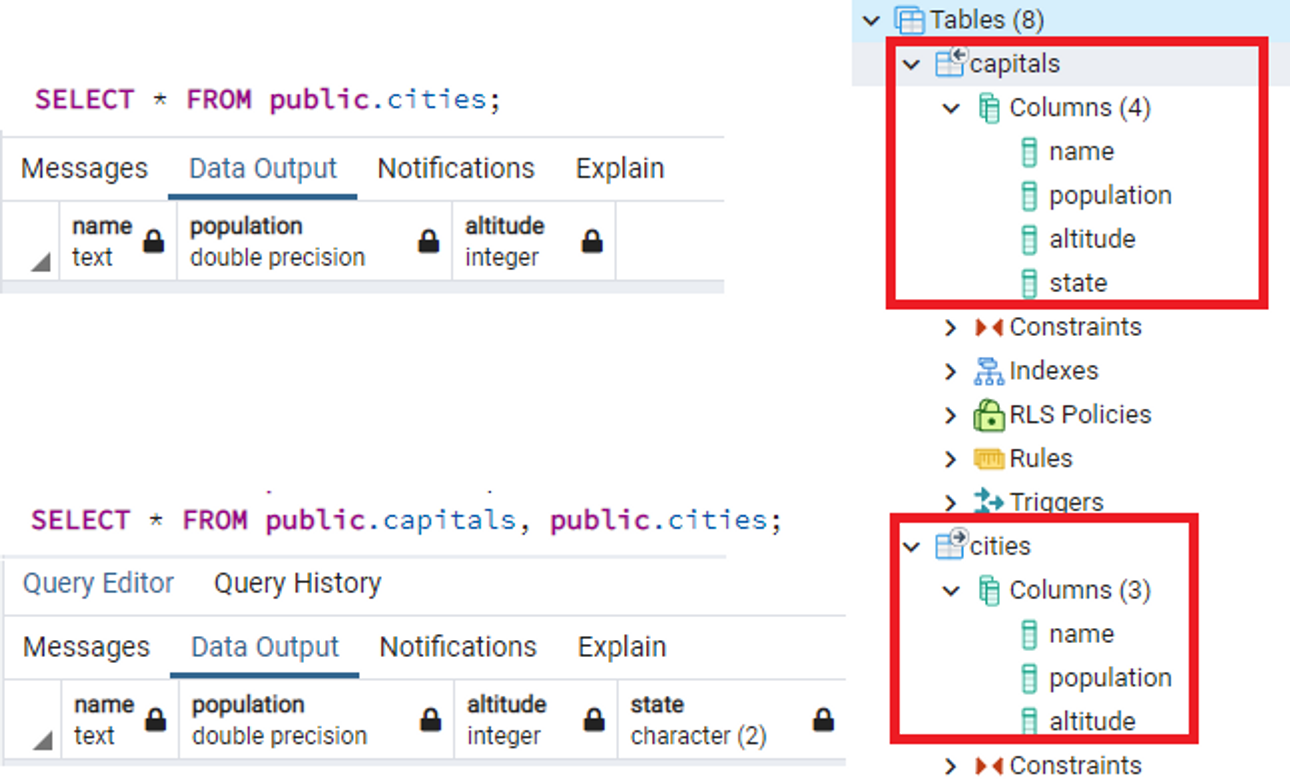
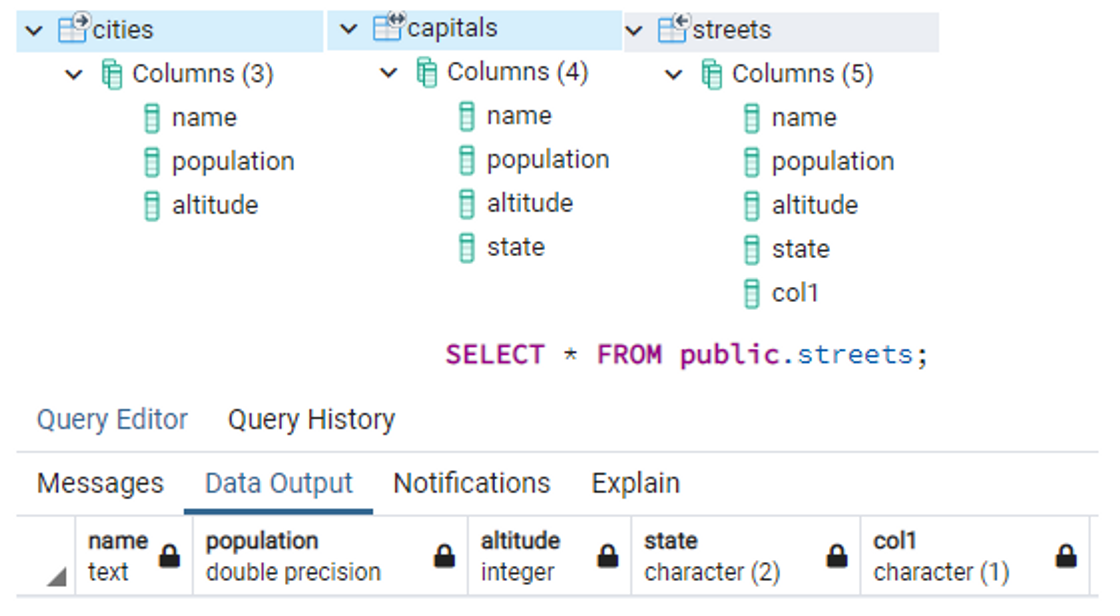
11. Table inheritance: 테이블상속
- Inheritance functionality is provided when creating a table.
- The table inheriting from another is referred to as the child table, while the table being inherited from is the parent table.
Constraints
| Maximum DB Size(Database Size) | Unlimited |
|---|---|
| Maximum Table Size | 32TB |
| Maximum Row Size | 1.6TB |
| Maximum Field Size | 1 GB |
| Rows per Table Limit | Unlimited |
| Columns per Table Limit | 250~1600 |
| Indexes per Table Limit | Unlimited |
6) Comparison with Competing Products
Oracle
- Extensive code validated over a long period
- Abundance of references available
- Drawback: Expensive cost
DB2 (IBM), MS SQL
- Similarities with Oracle
MySQL
- Diverse applications and references
- Adoption in enterprise development models with licensing concerns (Commercial usage cost↑)
PostgreSQL
- Strengthening its position in the enterprise DBMS market, including the release of the Postgres Plus Advanced Server product
- Well-suited for handling large capacities and complex transactions
- Advantages of relatively lower costs while offering a range of features
- Services include education (manual), consulting, migration, and technical support